PHP Beautifier
24 Sep 2008 -


I use BBEdit as my editor of choice and there is one thing that is sorely lacking - re-indention (or auto-indention) of code, meaning that tabs and spaces are inserted correctly to make the code flow in a nice way.
There is, however, a nice PHP library that does this automatically, called PHP Beautifier (which requires the PEAR package as well) and to automate this in BBEdit, use this script:
There is, however, a nice PHP library that does this automatically, called PHP Beautifier (which requires the PEAR package as well) and to automate this in BBEdit, use this script:
error_reporting(E_ALL|E_STRICT);
require_once ('PHP/Beautifier.php');
require_once ('PHP/Beautifier/Batch.php');
if ($argv[1]) {
  try {
    $beauty = new PHP_Beautifier();
    $batch = new PHP_Beautifier_Batch($beauty);
    $batch->addFilter('ArrayNested');
    $batch->setIndentChar("  ");
    $batch->setIndentNumber(1);
    $batch->addFilter('IndentStyles', array('style' => 'k&r'));
    $batch->setInputFile($argv[1]);
    $batch->process();
    print trim($batch->get());
  }
  catch(Exception $exp) {
    echo ($exp);
  }
}
What it does is parse $argv and re-indents the code following given rules, in this case "k&r", which stands for "Kernighan & Ritchie" and is a style that looks like this:
if (cond) {
	# do...
}
It's also set to indent with one tab character, and then you can choose whether you want to use the filter "ArrayNested" which makes this array declaration:
$apa= array("utter", "giraff", "elefant", "ostrich");
Look like this:
$apa= array(
  "utter",
  "giraff",
  "elefant",
  "ostrich"
);
But be warned, it also makes this:
if(in_array($apa, array("one", "two", "three"))){
  # do stuff...
}
Which can be messy, decide for yourself what you want to use
BBEdit?
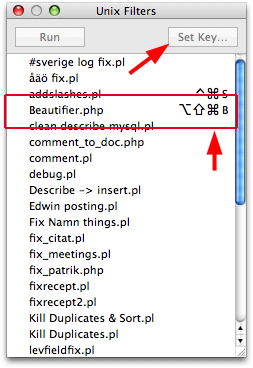
To insert this as a filter in BBEdit, save the above filter in BBEdit's script folder (in the menu #!->Unix Filters->Open filters folder) and then open the filter window palette (Windows->Palettes->Unix filters) and setup a shortcut key for the script. Then you're done! BBEdit will send along the current selection or the whole document (if no selection is active) in $argv
Mer i Webblog