Atlas har stöd för Retina-grafik
30 aug. 2012 - iphone, ipad, retina, atlas

Som jag skrev om förut så ställer ju detta med Retina-grafik till det för oss webutvecklare. Sedan jag skrev det så har jag haft en rätt så klar tanke på hur jag ska lösa problemet, men inte genomfört det förrän idag.
Det är egentligen ruskigt enkelt, och det resulterade i bara sex rader kod egentligen. Atlas har sedan dag ett haft en funktion för att skala bilder, så det handlade bara om att göra om den. Den är rätt enkelt och ser ut så här:
printimg("ok.png", 32);
Den där funktionen tar ikonen "ok.png" och skalar ned den till 32 pixlars bredd och returnerar sedan en IMG-tag.
Så när Atlas känner av att det finns en Retina-kapabel enhet i andra änden så gör den helt enkelt om den där "32" till "64" men returnerar ändå en IMG-tagg där bredden är 32. Så den omskalade bilden är alltså dubbelt så stor (snarare fyra gånger så stor) men visas i en fjärdedel av storleken. På en "normal" monitor så skulle detta vara bortslängda pixlar, men på en Retina-display så blir det alltså helt korrekt.
Här är ett exempel på skillnaden. På bilden till vänster så ser nu hur Atlas hanterade detta innan. All text är väldigt skarp, men bilderna är suddiga och pixliga eftersom dom ritas upp i halva upplösningen av skärmen. Bilden till höger är som det fungerar nu. Skarpa och tydliga bilder och ikoner ger helt klart ett mycket proffsigare intryck.
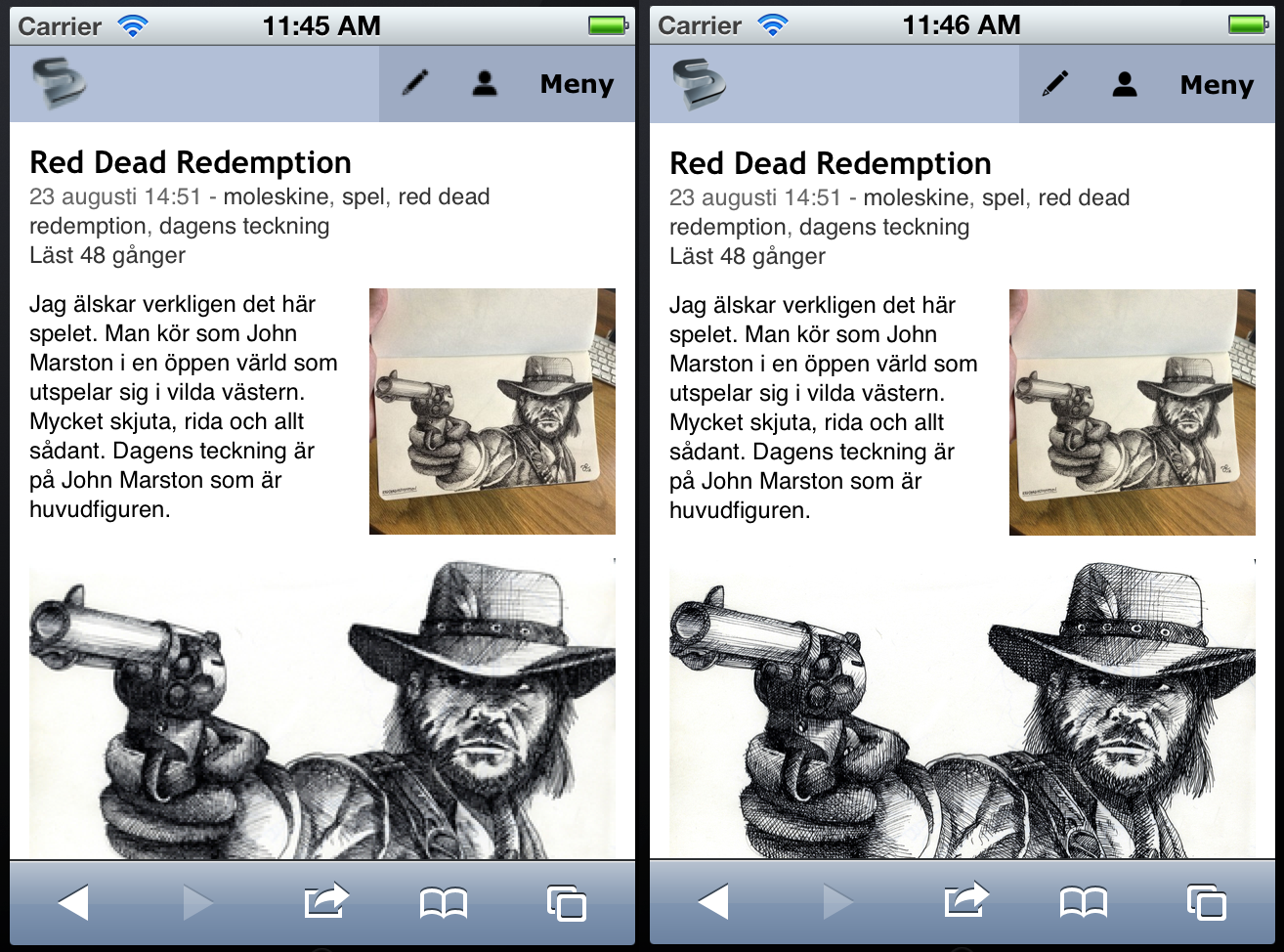
Effekten är tydligare på en riktig enhet, så surfa gärna in på sandman.net med din iPhone eller iPad med Retina-display.
Mer i Webblog



Nyckelord: iphone, ipad, retina, atlas, webb, design eller ikoner